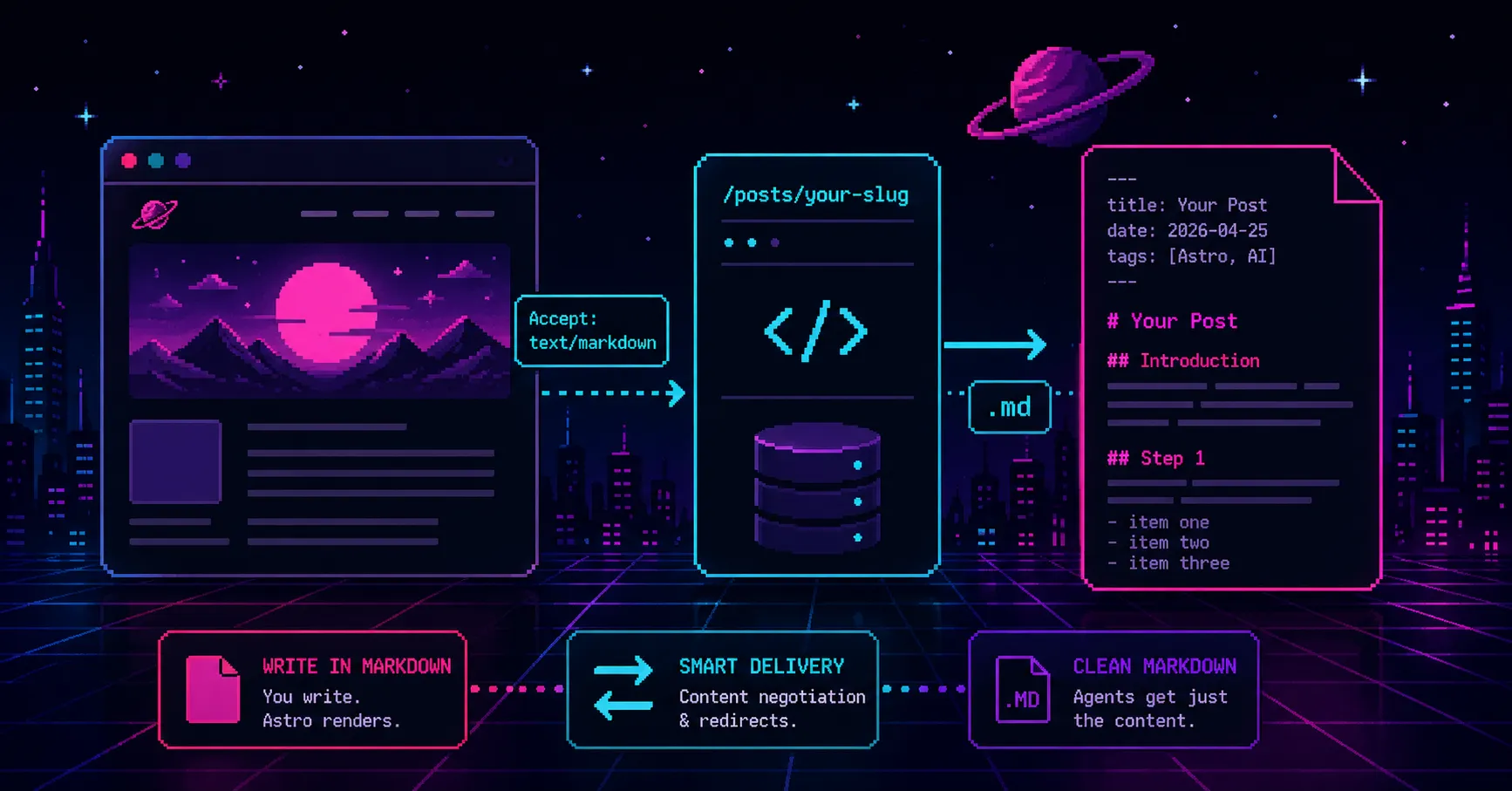
You write in Markdown. Astro renders it to HTML. Readers get a styled page.
Agents get the same HTML.
Navigation, scripts, layout wrappers, and your post somewhere in the middle. Sometimes the extraction lands clean. Sometimes it does not.
Serve Markdown alongside the HTML. Humans get the rendered page. Agents get just the post.
Three steps.
Step 1: serve each post as Markdown
The examples assume posts live under /posts. If yours live somewhere else, like /blog, substitute that prefix throughout.
Goal: every post reachable at /posts/your-slug.md as well as /posts/your-slug.
Create the post route
Add src/pages/posts/[...slug].md.ts. Astro treats .ts files in src/pages as API routes, so the .md extension becomes part of the URL. Substitute posts below with whatever you named your content collection.
The route needs Markdown to return. Two ways to get it.
Option 1: read the source file
You already wrote the Markdown, and it’s sitting on disk. Serve that file.
import { getCollection } from "astro:content";import { readFile } from "node:fs/promises";import type { APIRoute, InferGetStaticPropsType } from "astro";
export const getStaticPaths = async () => {  const posts = await getCollection("posts");
  return posts.map((post) => ({    params: { slug: post.id },    props: { post },  }));};
type Props = InferGetStaticPropsType<typeof getStaticPaths>;
export const GET: APIRoute<Props> = async ({ props }) => {  const { filePath, id } = props.post;
  if (!filePath) throw new Error(`Missing source file for ${id}`);
  return new Response(await readFile(filePath, "utf8"), {    headers: { "Content-Type": "text/markdown; charset=utf-8" },  });};
Agents get exactly what you wrote, frontmatter included, with no extra dependency and no formatting drift.
The glob loader sets filePath on every entry, relative to the project root. On-demand routes do not ship your source files, so keep this route static. If your project uses output: "server", add export const prerender = true.
Option 2: serialize from parsed data
Sometimes there is no file to read. Reach for a serializer when:
- Your content comes from a CMS or a remote loader.
- The route renders on demand and source files are not deployed.
- You want to reshape frontmatter before agents see it, like dropping internal fields.
Install yaml:
pnpm add yamlUse it for the frontmatter. Hand-concatenating YAML breaks the moment a title or description contains a colon or a quote.
import { stringify } from "yaml";
export function toRawMarkdown(entry: {  data: Record<string, unknown>;  body?: string;}) {  const frontmatter = stringify(    Object.fromEntries(      Object.entries(entry.data).map(([k, v]) => [        k,        v instanceof Date ? v.toISOString().split("T")[0] : v,      ]),    ),  ).trimEnd();
  return `---\n${frontmatter}\n---\n\n${entry.body ?? ""}`;}
The .map formats dates as YYYY-MM-DD so the output matches what you wrote. The ?? "" guards against an empty body. Because entry is loosely typed, the serializer accepts entries from any collection.
Then swap the GET body in the route:
import { toRawMarkdown } from "@/utils/serializers";
export const GET: APIRoute<Props> = ({ props }) => {  return new Response(toRawMarkdown(props.post), {    headers: { "Content-Type": "text/markdown; charset=utf-8" },  });};
If the route renders on demand, drop getStaticPaths and look the entry up inside GET using params.slug.
Advertise the alternate URL
Add an alternates prop to your layout so agents can find the .md URL from the HTML <head>. The site value comes from Astro.site, which Astro populates from the site field in astro.config.ts.
---interface Props {  // ...existing props  alternates?: { type: string; path: string }[];}
const { alternates = [] } = Astro.props;const site = Astro.site;---
{site &&  alternates.map(({ type, path }) => (    <link rel="alternate" type={type} href={new URL(path, site).toString()} />  ))}
Pass it from the post page:
<BaseLayout alternates={[{ type: "text/markdown", path: `/posts/${post.id}.md` }]}> <!-- post content --></BaseLayout>Add content negotiation on Vercel
Some agents skip the <head> lookup and send Accept: text/markdown against the regular URL. Handle that with a redirect in vercel.json:
{ "redirects": [ { "source": "/posts/:slug((?!rss\\.xml$)(?!.*\\.md$).+)", "has": [ { "type": "header", "key": "accept", "value": "(.*)text/markdown(.*)" } ], "destination": "/posts/:slug.md", "permanent": false } ]}The (?!.*\.md$) is a negative lookahead. It excludes URLs already ending in .md. Without it, a request to /posts/my-post.md with Accept: text/markdown redirects to /posts/my-post.md.md, then /posts/my-post.md.md.md, and so on.
The (?!rss\.xml$) does the same for the feed. The pattern matches every path under /posts. Anything that is not a page needs excluding, or it redirects to a .md that does not exist.
Every page the pattern matches also needs a .md route. If you have tag pages under /posts, like /posts/tags/react, they match too, so give them a .md route or exclude them.
Verify all three paths:
# Direct .md URLcurl https://example.com/posts/your-slug.md
# Content negotiation on the HTML URLcurl -H "Accept: text/markdown" -L https://example.com/posts/your-slug
# Static files stay put (expect a 200, not a redirect)curl -I -H "Accept: text/markdown" https://example.com/posts/rss.xml
Step 2: extend Markdown endpoints to other pages
Use full absolute URLs in any Markdown served to agents. Relative paths lose their context the moment an agent reads the page on its own. If an agent encounters /posts/my-post.md, it has no way to know which site that path belongs to or how to get there.
Same pattern as Step 1 for anything else worth exposing. A .md.ts route, a Markdown response.
If your page content lives in hardcoded config or directly in .astro files, move it into a content collection first. Components and the Markdown endpoint then read from one place. Otherwise the two copies drift. This post assumes a pages collection already exists; if not, the Astro content collections docs cover setup.
For a single page like /about, create src/pages/about.md.ts:
import { readFile } from "node:fs/promises";import type { APIRoute } from "astro";
export const GET: APIRoute = async () => {  const source = await readFile("src/content/pages/about.md", "utf8");
  return new Response(source, {    headers: { "Content-Type": "text/markdown; charset=utf-8" },  });};
You know the path up front, so there is nothing to look up.
If you went with Option 2, look the page up with getEntry("pages", "about"), return a 404 when it is missing, and pass it to toRawMarkdown. The same serializer handles both collections.
The posts index works the same way. Add src/pages/posts.md.ts and return the list as Markdown.
Then extend vercel.json. One rule for the home page, one named group for the rest:
{ "redirects": [ { "source": "/", "has": [ { "type": "header", "key": "accept", "value": "(.*)text/markdown(.*)" } ], "destination": "/index.md", "permanent": false }, { "source": "/:page(about|posts)", "has": [ { "type": "header", "key": "accept", "value": "(.*)text/markdown(.*)" } ], "destination": "/:page.md", "permanent": false }, { "source": "/posts/:slug((?!rss\\.xml$)(?!.*\\.md$).+)", "has": [ { "type": "header", "key": "accept", "value": "(.*)text/markdown(.*)" } ], "destination": "/posts/:slug.md", "permanent": false } ]}When you add a page, add its name to the group.
Resist collapsing these into a catch-all like /:path*. It also matches /llms.txt, /robots.txt, /favicon.svg, and any PDF. Every agent that sends Accept: text/markdown gets redirected to a .md URL that does not exist. List only the pages that have Markdown.
Step 3: add /llms.txt
llms.txt is an emerging proposal for giving LLMs a structured overview of a site. It lives at /llms.txt and uses a simple Markdown format: a top-level heading with the site title, a blockquote summary, then sections linking to machine-readable versions of your content.
Where robots.txt tells crawlers what to avoid, llms.txt tells them what to read.
Create the llms.txt route
import { getCollection } from "astro:content";import type { APIRoute } from "astro";
import { toLlmsTxtMarkdown } from "@/utils/serializers";
export const GET: APIRoute = async ({ site }) => {  const posts = await getCollection("posts");
  return new Response(toLlmsTxtMarkdown(posts, site), {    headers: { "Content-Type": "text/plain; charset=utf-8" },  });};
Write the llms.txt serializer
A small helper sorts posts newest-first:
import type { CollectionEntry } from "astro:content";
const sortByPublishDate = (  a: CollectionEntry<"posts">,  b: CollectionEntry<"posts">,) => b.data.publishDate.getTime() - a.data.publishDate.getTime();
The template below is a starting point. Swap the name, summary, and link list for whatever the site actually has:
export function toLlmsTxtMarkdown(  posts: CollectionEntry<"posts">[],  site: URL | undefined,) {  const base = site?.origin ?? "";  const sorted = posts.toSorted(sortByPublishDate);
  const postRows = sorted    .map(      ({ data, id }) =>        `- [${data.title}](${base}/posts/${id}.md): ${data.description}`,    )    .join("\n");
  return `# Your Name
> A short description of who you are and what your site covers.
## Pages
- [Home](${base}/index.md): Short description- [About](${base}/about.md): Short description
## Posts
- [Posts](${base}/posts.md): Full list of all posts${postRows}
## Optional
- [RSS feed](${base}/posts/rss.xml): Syndication feed with post metadata`;}
Two things worth noting. site comes from the API route, so the base URL stays in astro.config.ts rather than duplicated here. toSorted returns a new array, so the serializer does not reorder the collection as a side effect.
For a live example, see this site’s /llms.txt.
What you get
Humans visiting a post get the rendered page.
Agents that know to append .md get Markdown directly.
Agents that ask via Accept: text/markdown land on the same Markdown through the redirect.
Anything pointed at /llms.txt gets a map of the site with direct links to the Markdown for every page exposed.
Only vercel.json is Vercel-specific. If you deploy elsewhere, check whether the host supports header-based redirect conditions. Netlify and Cloudflare do, with different syntax. The llms.txt spec and the Vercel redirects docs cover the rest.
This post is itself available as Markdown, built with the pipeline above.
That’s it.